

Forking is available in Chroma Cloud only. The storage engine on single-node Chroma does not support forking.
How it works
- Copy-on-write: Forks share data blocks with the source collection. New writes to either branch allocate new blocks; unchanged data remains shared.
- Instant: Forking a collection of any size completes quickly.
- Isolation: Changes to a fork do not affect the source, and vice versa.
Try it
- Cloud UI: Open any collection and click the “Fork” button.
- SDKs: Use the fork API from Python or JavaScript.
Examples
Pricing
- $0.03 per fork call
- Storage: You only pay for incremental blocks written after the fork (copy-on-write). Unchanged data remains shared across branches.
Quotas and errors
Chroma limits the number of fork edges in your fork tree. Every time you call “fork”, a new edge is created from the parent to the child. The count includes edges created by forks on the root collection and on any of its descendants; see the diagram below. The current default limit is 4,096 edges per tree. If you delete a collection, its edge remains in the tree and still counts. If you exceed the limit, the request returns a quota error for the NUM_FORKS rule. In that case, create a new collection with a full copy to start a fresh root.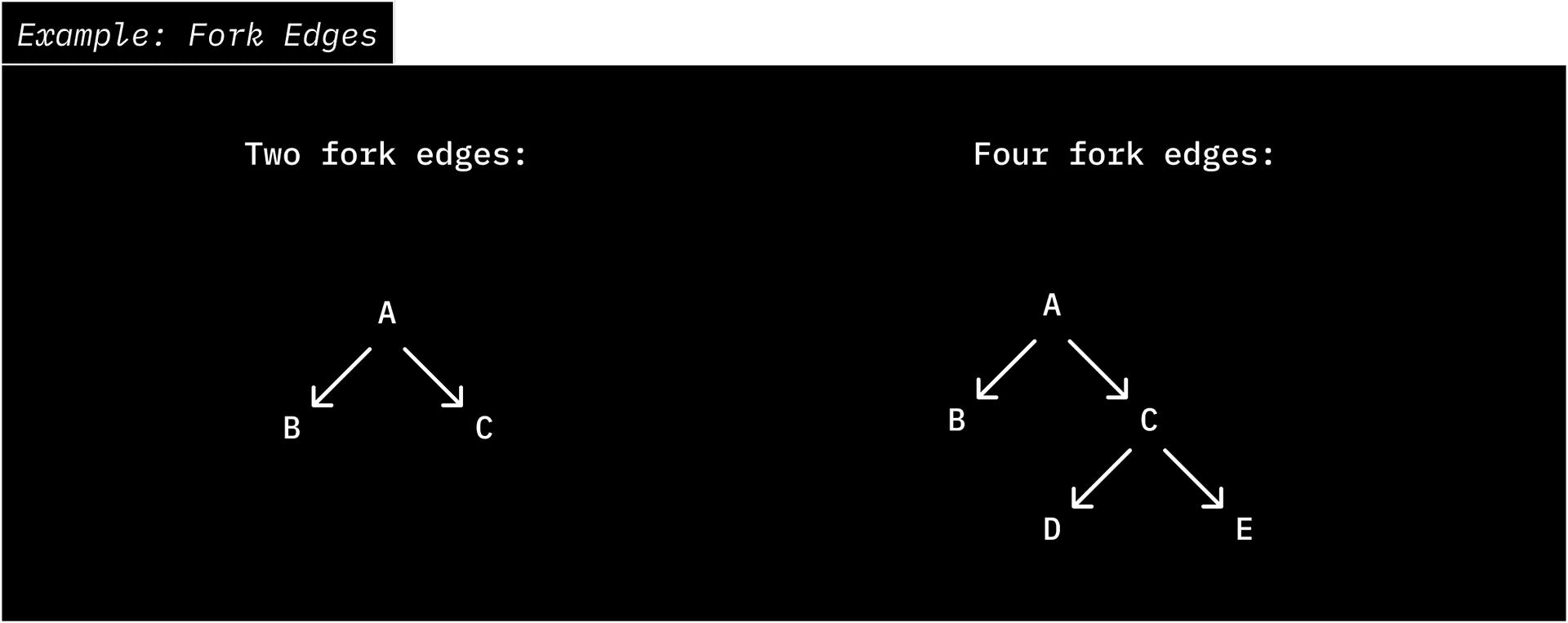
When to use forking
- Data versioning/checkpointing: Maintain consistent snapshots as your data evolves.
- Git-like workflows: For example, index a branch by forking from its divergence point, then apply the diff to the fork. This saves both write and storage costs compared to re-ingesting the entire dataset.
Notes
- Your forked collections will belong to the same database as the source collection.